

Are you tired of writing product descriptions in emails that speak in bromides? We have a much better solution for you to use in their place.
Use user-generated content (UGC) in your email campaigns.
Adding user-generated content to your email templates for Mailchimp can take much content work off your plate. Because as long as brands offer high-quality products and services, they will always have user-generated content.
You can channel this constant content stream to your email campaigns, attract new customers, drive engagement, and build your brand’s loyal community.
Plus, UGC is a great tool for brands to deliver engaging product content experiences. Nosto says that 87% of marketers prefer UGC over models or influencers to showcase diversity in marketing.
The feeling is mutual in the case of customers.
Before confidently hitting the “Add to cart” and “Buy Now” buttons, shoppers want to check other shoppers’ experiences. They want to see real-world, unfiltered, non-editorial product images and videos that scream authenticity.
Let’s walk you through the process of incorporating UGC into your Mailchimp email templates.
What is User-Generated Content (UGC)?
Just like it sounds, user-generated content is the content created and contributed by the users, the real users of the product. It’s not content that brands pay copywriters to write.
UGC is when you snap a photo of your new sneakers and share it on Instagram. UGC is when someone posts an unboxing video of their latest smartphone on Facebook. In other words, a digital counterpart of the age-old marketing strategy to attract new customers–word of mouth.
UGC works big time for email marketing because it demonstrates to your target audience how much one of “them” adores your products.
Your prospective buyers are on the lookout for sincere testimonials from real people about your brand. So, when they read UGC in your email newsletters, they become more interested in you and are more likely to trust you for their next purchase.
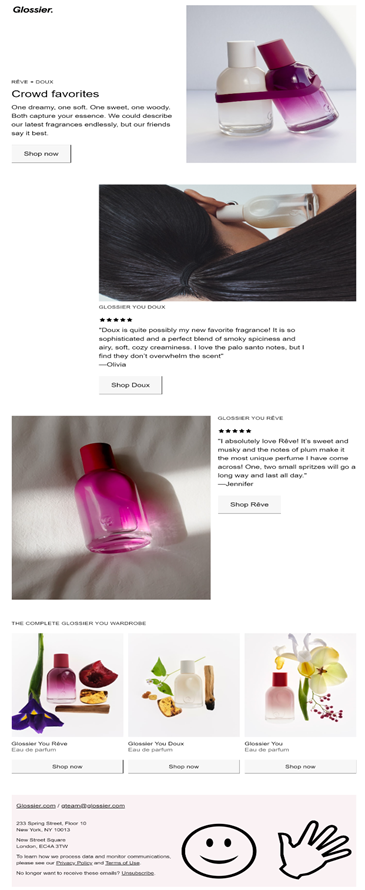
Plus, your current consumers are eager to share their opinions as well. When you tap into their creativity and enthusiasm through UGC, you connect with them on a deeper level. Not to mention the steady flow of engaging (and free!) content for your Mailchimp email templates! A win-win!
1. Why Add UGC to Mailchimp Email Templates?
There are several reasons why you should use UGC as an important feature in your Mailchimp email marketing campaigns:
1) UGC Means Authentic Social Proof
Researching a product before purchasing is as common as checking the weather before heading out for the day. You do it by default.
As many as 75% of consumers read online reviews to research brands. But they are also concerned about doctored reviews.
So, no matter how much time and money you spend creating oh-so-perfect customer testimonial copy and photos, your audience will get the feeling of “being marketed to.”
UGC imparts much-needed authenticity and organicity to the content that, in turn, boosts your prospects’ trust index. Knowing that the content comes from their peers gives them confidence that your products’ great features are more than just a sales pitch.
2) UGC Saves You Money
Now we are talking!
Using customer reviews is mostly free (with credit given to the creator). At most, you might have to offer incentives to encourage higher-quality UGC.
With such a variety of content and social media channels, it’s absolutely possible for your marketing team to leverage as much UGC as you would like. This reduces the cost of paid content production.
The budget you free up using UGC in your email marketing can be diverted to other promotional activities and paid channels. As a result, you expand your reach further.
3) UGC is Easy to Scale
According to Hubspot, finding fresh content ideas and creating engaging content is the ball and chain of marketers’ lives.
UGC tackles this challenge. The fact that customers create UGC makes it far easier to gather compared to brand-produced content.
Every day, millions of people share product experience content. Imagine if a small percentage of them mention your brand.
You will have a goldmine of genuine content ready to include in your Mailchimp email templates. With every new user, there is also a network of family and friends to reach.
And who knows, you might even be pleasantly surprised by the creative ways customers use your products.
Find the customers who created it, and you’ll have valuable stories to share with your email subscribers.
2. Best Ways to Add UGC to Your Mailchimp Email
Many marketers have a hard time figuring out ways to collect user-generated content for their email campaigns. Well, it’s not difficult if you understand the different ways you can incorporate UGC.
The following are good examples of UGC you should consider featuring in your email templates for Mailchimp:
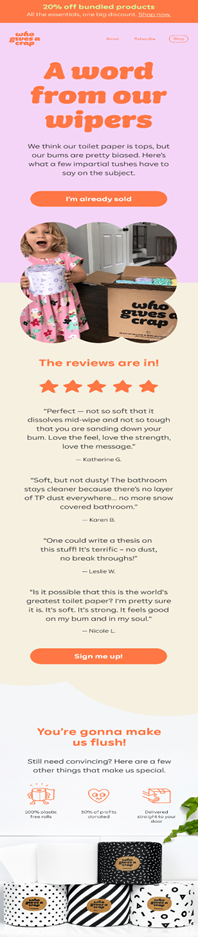
1) Customer Reviews and Ratings
Customer reviews and testimonials can be the best sources for UGC because customers will want information about actual experiences your business delivers before making a purchase decision.
As many as 72% of customers find customer reviews extremely important when deciding to complete the purchase.
That’s why if your product garners positive reviews from your customer base, you must include that in your email newsletters.
IMPORTANT>> Long chunks of UGC text don’t work well in emails.
Instead, pick out the most impactful content from the lengthy testimonials. Vivid adjectives and strong CTAs are some good parts to focus on when adding customer reviews to emails.
2) Customer Images and Videos
81% of marketers believe visual UGC resonates more with customers than professionally shot photos.
Any email discussing product usage followed by such visual UGC is a straightforward yet effective way to inspire confidence in your prospects. It makes your email copy personal, authentic, and appealing.
You can ask your customers to submit their pictures and videos of themselves using the products.
3. How Do You Collect UGC for Your Email Campaigns?
Do you need a sophisticated UGC collection system to collect and add UGC to your Mailchimp email templates? Not really.
Here are some smart, simple ways to collaborate with your customers and help them promote your business through UGC.
DMs and Social Media Posts
Your social media posts and DMs are the best places to see UGC visibly in action and in the most legitimate manner. Plus, they are most accessible to you. Then why not spend time scouring through them and listening to the buzz around your brand?
If you do, you will find UGC in the following places. Just screenshot them and share them in your email newsletters:
- Your social media post comments.
- A DM by a customer or friend.
- Social media share
Hashtag Campaigns
Create a unique branded hashtag and ask your customers to use it while posting about products on social media. This authentic content from real users then can be repurposed in your email marketing campaigns for more engagement.
Encourage people to generate more high-quality UGC by offering rewards. For instance, offer a prize for the most creative or popular content shared using your hashtag.
To help your brand’s hashtags gain traction, use them with other trending and relevant hashtags.
Remember to promote your hashtags in emails. Send out email newsletters that announce the hashtag initiative, explain the concept behind it, and invite your subscribers to join in.
Review Link in the Post-purchase Email
You might already send your brand-new customers an automated post-purchase email sequence. Then why not leverage them and ask the shoppers about how their new product is?
Start with a simple “Thank you for your purchase” email to welcome your new customers. But hold off on the review request for now.
After around 30 days—once they’ve had time to use the product—send a follow-up email asking how they are enjoying the experience. This is the perfect time to include a direct review link and ask for their feedback.
Better still, embed a quick survey in the email so they can share their thoughts without ever leaving their inbox.
You can also create a “Reviews” section on your website where users can leave feedback, creating a substantial reservoir of UGC for your email marketing.
Contests
Create a contest. Encourage your customers to share an image or video of them holding or using the product in exchange for free merchandise.
Or, ask them to post this visual UGC on social media platforms.
4) Best Practices for Using UGC in Mailchimp Emails
- Make it easy for users to participate. Offer them creative freedom. If you have rigid guidelines for UGC submissions, you will limit engagement by excluding participants.
- Incorporate content that is of genuine value to your target audience.
- Avoid using UGC that sounds insincere or extra promotional.
- Highlight the customer first. Praise their behavior that contributes to UGC.
- Ensure to have legal permission to use the submitted UGC in the open sources. It should also not violate any content standard.
- Give proper credit to the customers whose content you feature in your Mailchimp email templates.
Key Takeaways
Adding user-generated content to your Mailchimp email templates works. And it’s easy, too.
Customer reviews, testimonials, and visuals are good places where you want to start integrating UGC into your email campaigns.
Your first step could be as simple as starting a conversation on social media, running a hashtag campaign, and asking shoppers for reviews in post-purchase emails. The content you generate can be a great way to create a steady flow of fresh and engaging content for your email copies.
Even if the idea of using UGC in emails feels a bit unfamiliar, it’s actually easier than you might think—and it can have a huge impact on email engagement and customer loyalty.